
6 Simple Steps to Create a Customer Onboarding Email Sequence

Congratulations on winning a new customer! Now it's time to show them where to find helpful resources, how to get support, who to contact with questions, and what to do next.
If you don’t do this well, they may struggle to see the value of what they’ve purchased.
This is where a customer onboarding email sequence comes into play. Instead of leaving customers to figure everything out on their own, you can guide them through the early stages of working with your business.
The opportunity is worth paying attention to. In Simon-Kucher's 2025 Global Software Study, 44% of software executives identified lifecycle marketing as an effective lever for improving net revenue retention, while 39% pointed to a dedicated onboarding team. (Source: Simon-Kucher)
1. Welcome Email, First!
This first email sets the tone for a customer relationship. Make sure to send it shortly after someone makes a purchase, signs a contract, or signs up for your product or service.
Start by thanking them for choosing your business and confirming what happens next. Keep the message friendly and straightforward. The goal is to welcome customers while making sure they know where to go for questions.
Your welcome email should include:
- A genuine thank-you and welcome.
- A quick reminder of what they've purchased or signed up for.
- Any important next steps, such as account setup or a kickoff meeting.
- A clear way to contact your team for help.
Short and sweet is best. You don't need to explain everything about your business in the first email. Give customers the information they need right now and save the rest for later.
There's also a good reason to make this email count. A 2026 benchmark study from Meisa Research analyzed 16,827 onboarding and win-back emails. It found that 28.8% of recipients opened welcome emails after filtering out identified bot and privacy-related opens, and 6% clicked. (Source: Meisa Research)
2. Explain the Next Steps
Try to keep this simple. Once you've welcomed a new customer, help them take the next step.
Identify the first action that will help customers begin seeing value from your product or service, then make it easy to complete.
Let’s say you offer a digital platform; your email could include a start guide to help customers get set up. If you provide a service, you might explain how to prepare for a kick-off call or share brand materials.
Here’s how to make this email more effective:
- Focus on one main action.
- Break complicated tasks into simple steps.
- Link directly to the relevant page, guide, or form.
- Explain why the action matters.
The goal isn't to show customers every feature or service you offer. It's to help them make progress without feeling overwhelmed.
3. Share Helpful Resources
New customers have a lot of questions. This email is a good place to share your most useful educational content. Think about the questions customers frequently ask during onboarding and use those to guide what you include.
Helpful resources might include:
- Getting-started guides or tutorial videos.
- Frequently asked questions.
- Product documentation or knowledge base articles.
- Examples, templates, or checklists.
- Relevant blog posts or customer case studies.
You shouldn’t send everything in one email. Choose two or three resources that match your customer's current stage and link to additional information if needed. Less is more.
Make every resource purposeful. A guide that helps customers complete a task is more useful than a long list of links they won’t touch.
4. Send Follow-Ups at the Right Time
You don’t want to overwhelm your customers, but you do want to keep the conversation going. Give customers enough time to see each message while staying available when they need help.
Start with a simple schedule, then adjust it based on your customer journey.
Here's an example of how you could structure your first few emails:
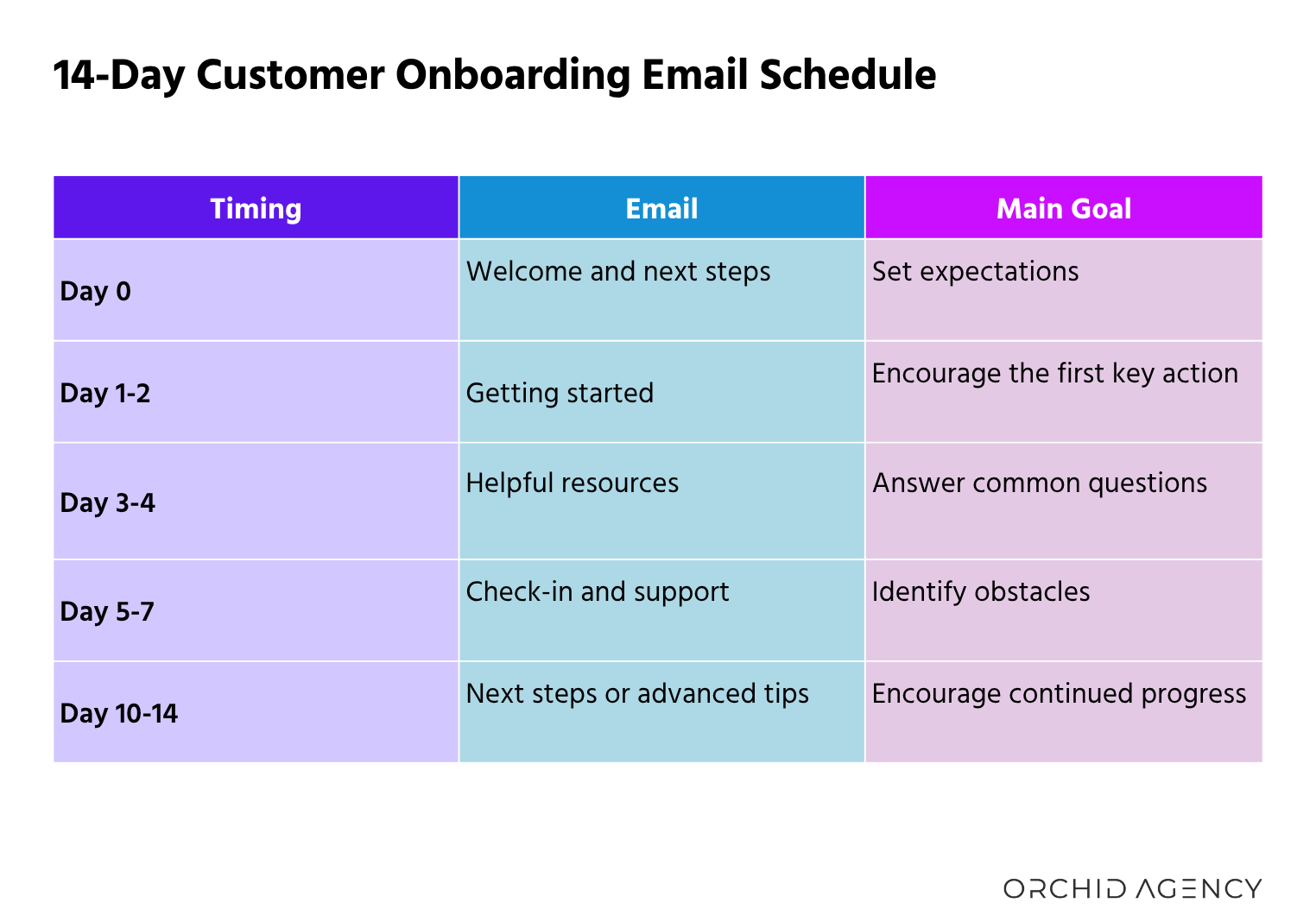
This is a starting point, not a strict formula. A complex B2B service may need a longer onboarding period, while a simple product might require only a few emails.
Also worth mentioning is tailoring follow-ups to your customer’s progress, including sending reminders when someone hasn't completed an important setup step.
For example, if a customer has already completed setup, skip the setup reminder and send a relevant next step instead. If they've stalled, send a helpful nudge rather than another general introduction.
5. Keep Checking In!
Important: Keep your check-in email personal. Automated emails are good for staying in touch, but they shouldn't replace direct customer communication. The first 90 days are especially important. According to Moxo's 2026 State of Churn and Retention in B2B Organizations report, 43% of client churn occurs during this period.
Use your check-in to start a conversation and find out how things are going:
- Ask if they've reached their first milestone.
- Find out if anything is confusing or holding them back.
- Remind them who to contact with questions.
- Offer a quick call to talk through any challenges.
- Share a resource that addresses their specific needs.
6. Measure and See What's Working
You don't need a million metrics to get started. Focus on whether customers are engaging with your emails and taking the actions you're encouraging.
Start by tracking:
- Click-through rate: Are customers clicking the links and resources you share?
- Key action completion: Are they finishing setup, attending kickoff calls, or completing other important steps?
- Support questions: Are customers still struggling with the same issues?
- Unsubscribes: Are certain emails prompting customers to stop receiving messages?
- Retention or continued engagement: Are customers who complete onboarding more likely to continue using your product or service?
You should review each email separately. If customers click a tutorial but don't complete the task, the next step may need to be clearer. If one message has a high unsubscribe rate, reconsider its timing, relevance, or content.
Remember: A simple onboarding sequence helps customers get started, answers questions before they become bigger issues, and keeps communication going after the sale.


